Court manual / PC release · keyboard & mouse
How to serve in Just Volleyball
Stand inside the green service area. Left-click on the ground to toss, jump with Space, aim at the opponent’s court, then left-click in the air. Stay grounded for a standing serve: toss, aim, then left-click again.
Updated 2026-11-16 · PC release · keyboard & mouse
- LMBToss on the ground
- SpaceJump
- Aim + LMBHit in the air
From input to contact
Start inside the green service area
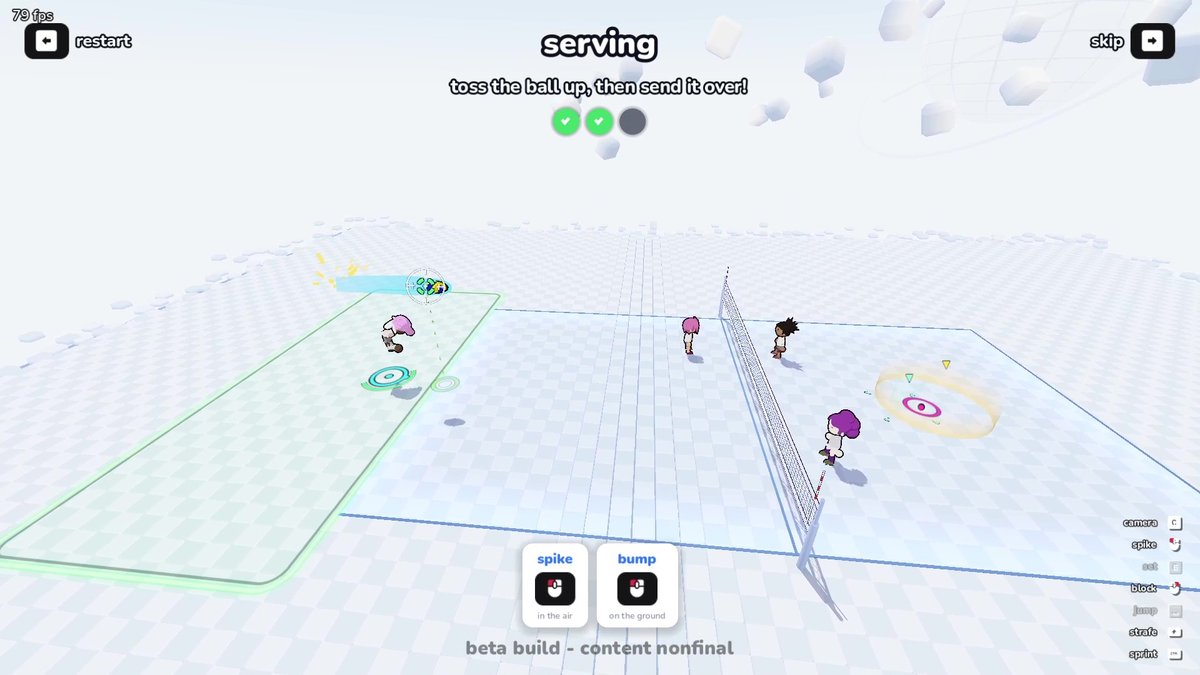
Serve from the green frame outside your own court. You cannot start a legal serve from inside the court. For a first attempt, stop moving and put the cursor near your player before the toss.
 Open full-size image ↗
Green frame: serve from here. Purple circle: the intended target across the net. nu’s tutorial screenshot is from a beta build; the input instructions here follow the release-day specification. Toss first; then jump to meet the ball
Left-click on the ground to toss the ball. A nearby cursor sends the toss upward; a distant cursor sends it toward that court location. Keep the first toss close while learning. Press Space to jump, then move your cursor into the opponent’s court.
Hit while airborne and choose the variation
Left-click in the air to spike the toss. The movement input used for that airborne hit selects the jump-serve variation. First land a neutral serve; then repeat the same sequence with one direction changed.
Four jump-serve variations Variation Movement during airborne hit Use it to practise Normal No direction A repeatable toss → jump → hit sequence Power Forward Adding forward input to the same airborne contact Curve Left or right Changing the ball’s curve with side input Jump float Backward The backward-input, no-spin variation Use the standing branch when the jump timing fails
Remain in the green service area. Left-click to toss, move your cursor to the opponent’s court, then left-click again while still on the ground. A standing serve is a valid alternative; the second click is a grounded hit, so no jump timing is required.
Charge and speed: change one thing at a time
You can charge the toss, jump and airborne hit, but charging everything to the maximum is not the basic requirement. Dash-jumping adds momentum and stronger contact; learn a reliable toss and contact before adding it. A charged toss toward a distant cursor also moves the ball away from you. Adjust that distance before trying to jump higher.
When it works
The ball crosses the net and lands inside the opponent’s court. In Practice → Tutorial, put the serve into the yellow target area to advance.
If it does not work
If the serve does not start, return to the green service frame. If you jump away from your toss, stop moving and start with a cursor close to your player. If contact is inconsistent, use the standing branch before adding jump height or dash momentum.
Sources & version
Inputs and conditions follow nu’s Japanese specification guide and tutorial, updated for the November 16, 2026 PC release (November 17 in Japan). Screenshots retain their beta-build context.