PC release / Court manual
Just Volleyball
Wiki & Guide
Know the input.
Make the next touch.
Short routes from “which button?” to a playable rally. Start with a serve, keep the return alive, and learn what your cursor actually controls.
New player? Start with the controlsUpdated 2026-11-16 · PC release · keyboard & mouse
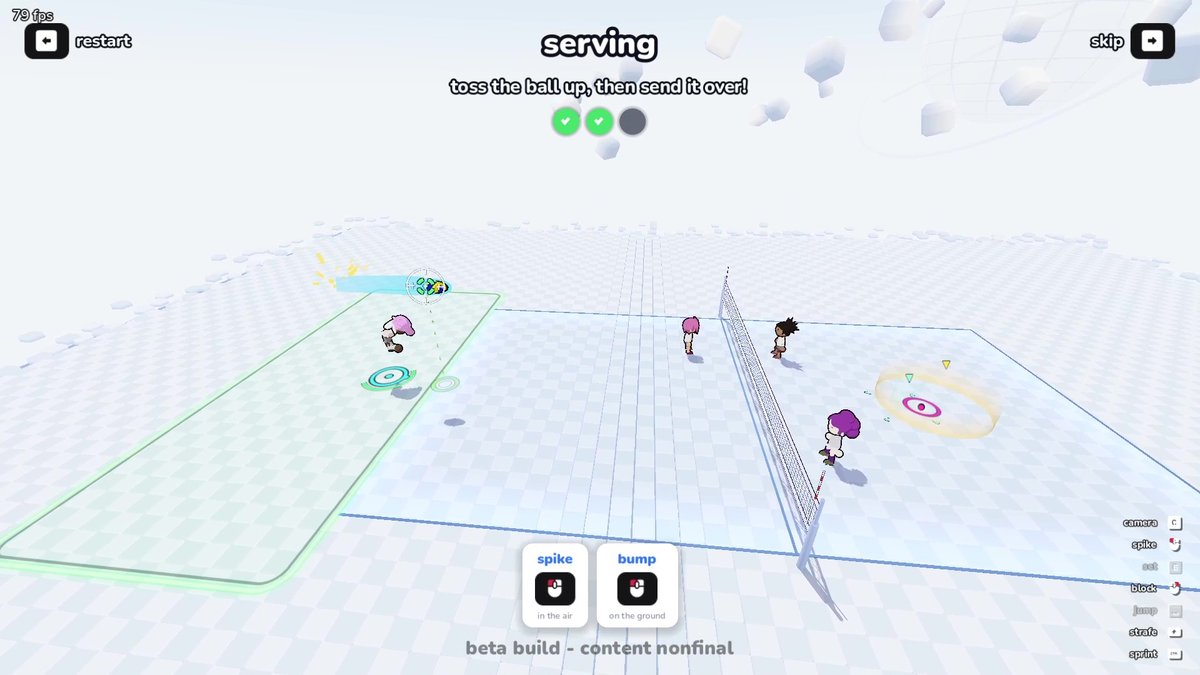
Build your first rally
Find a specific action ↓PUT IT IN PLAY
Serve
Ground toss → jump → airborne hit.
Or stay grounded and hit again.
Receive & dive
Move to the ball. Aim at your teammate.
A dive needs one grounded right-click.
Block
Jump, then right-click once.
The block lasts until you land.
The court manual
Find your next touch.
10 guides · PC keyboard & mouse
Showing 10 guides
01ControlsLMB receives on the ground and spikes in the air. RMB dives on the ground and blocks in the air. Open Profile settings to change bindings.02Camera & CursorC cycles four cameras; V or the wheel zooms. Use Profile settings for Reach Marker, Last Touch Outline, cursor assist and set assist.03ServeToss on the ground, jump, then left-click in the air. Use forward, sideways or backward input for power, curve or float serves.04Set & Quick SetE sets toward your cursor. A charged near-cursor set rises higher; a charged far-cursor set travels lower and faster for a quick attack.05SpikeJump to meet the set, aim the cursor into the opponent’s court and left-click in the air. Add sprint momentum after contact is consistent.06Receive & DiveMove to the landing point and left-click to bump. Grounded right-click dives and lifts the ball automatically toward your cursor.07BlockJump near the net and right-click once in the air. The block lasts until landing; the cursor sets facing and side input tilts the arms.08MovementWASD moves, Ctrl or a double tap sprints, Shift strafes and cancels a jump charge. Moving jumps carry momentum; low stamina weakens dives.09PracticePractice reopens Tutorial and Free Play. Press R for a ball in Free Play; use its five options, then take the rally into a Local CPU match.10Rules & TeamworkA team has three touches; the same player cannot touch twice in a row except in 1v1. Blocks do not count. Use red X, outlines and 1–7 calls.
No matching guide. Try an action such as serve, block or set.
One game. Different jobs for the same button.
Left-click receives on the ground and spikes in the air. Right-click dives on the ground and blocks in the air. Check your player’s state before adding more inputs.